Hello,
I have noticed a contrast/UI bug in PhonerLite when using a dark theme.
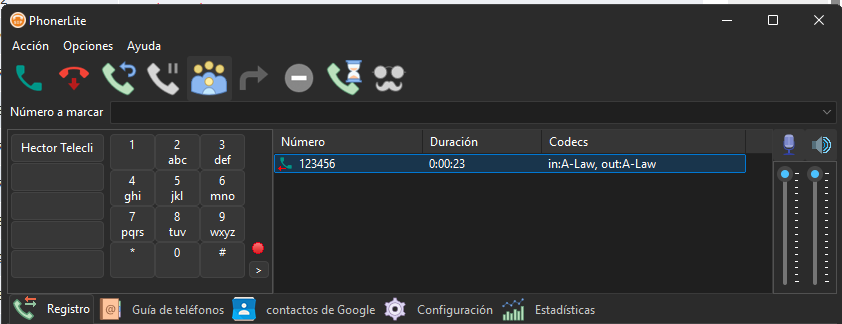
When a call is active and not being recorded, the call information text (Number, Duration, Codecs) is displayed in white italics, which is perfectly readable against the dark background.
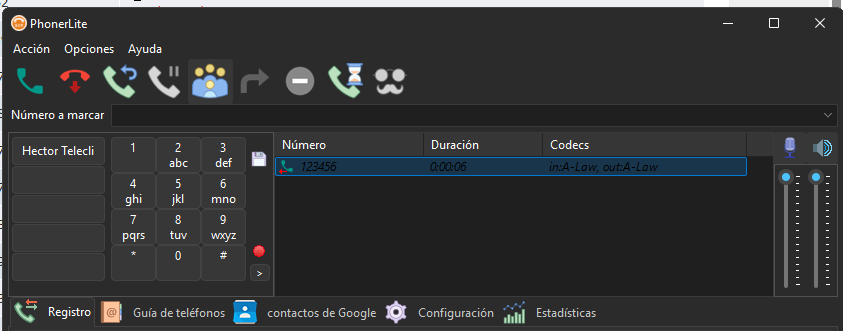
However, the moment I start recording the call (the recording dot turns red), the text color of that active call entry dynamically changes to black or a very dark grey. This makes the text completely unreadable against the dark UI background.
Steps to reproduce:
Use PhonerLite with a dark background/Windows dark mode.
Make or receive a call.
Observe that the text is white and readable by default.
Click the recording button to start recording the call.
Notice that the text instantly switches to black, losing all contrast.
Expected behavior:
The text should remain white (or change to a high-contrast color like red or light red to indicate recording) so it stays legible while recording is active.
I am attaching two screenshots demonstrating the behavior (one without recording and one during recording).
Thank you for your hard work on PhonerLite!
Screenshots:




 Pages: 1
 UI Bug:Call list text color turns black/unreadable (Read 382 times)


